Showing posts with label #fiori. Show all posts
Showing posts with label #fiori. Show all posts
Tuesday, 30 July 2019

Friday, 5 October 2018
Determine sap table size via program RSTABLESIZE
- Go to Transaction code SE38 and Enter the program name as RSTABLESIZE, Execute.

- Enter the Table name and click on execute.

- Output.

Tuesday, 9 August 2016
Example for Hashed Internal Table
Steps
- Go to Transaction Code SE38.

- Enter the program name which start's with Y or Z < program name > and click on CREATE button.

- Enter the Title.
- Select the Attribute Type as Executable Program.
- Click on SAVE button.

Source Code
TYPES : BEGIN OF TY_MAKT,
MATNR TYPE MAKT-MATNR,
SPRAS TYPE MAKT-SPRAS,
MAKTX TYPE MAKT-MAKTX,
END OF TY_MAKT.
DATA : WA_MAKT TYPE TY_MAKT,
IT_MAKT TYPE HASHED TABLE OF TY_MAKT WITH UNIQUE KEY MATNR.
WA_MAKT-MATNR = 122.
WA_MAKT-SPRAS = 'EN'.
WA_MAKT-MAKTX = 'LENOVO'.
INSERT WA_MAKT INTO TABLE IT_MAKT.
CLEAR WA_MAKT.
WA_MAKT-MATNR = 123.
WA_MAKT-SPRAS = 'EN'.
WA_MAKT-MAKTX = 'DELL'.
INSERT WA_MAKT INTO TABLE IT_MAKT.
CLEAR WA_MAKT.
WA_MAKT-MATNR = 124.
WA_MAKT-SPRAS = 'EN'.
WA_MAKT-MAKTX = 'HP'.
INSERT WA_MAKT INTO TABLE IT_MAKT.
CLEAR WA_MAKT.
WA_MAKT-MATNR = 122.
WA_MAKT-SPRAS = 'DE'.
WA_MAKT-MAKTX = 'MICROSOFT'.
INSERT WA_MAKT INTO TABLE IT_MAKT.
CLEAR WA_MAKT.
WA_MAKT-MATNR = 124.
WA_MAKT-SPRAS = 'EN'.
WA_MAKT-MAKTX = 'LENOVO'.
INSERT WA_MAKT INTO TABLE IT_MAKT.
CLEAR WA_MAKT.
LOOP AT IT_MAKT INTO WA_MAKT.
WRITE : / WA_MAKT-MATNR,
WA_MAKT-SPRAS,
WA_MAKT-MAKTX.
ENDLOOP.
MATNR TYPE MAKT-MATNR,
SPRAS TYPE MAKT-SPRAS,
MAKTX TYPE MAKT-MAKTX,
END OF TY_MAKT.
DATA : WA_MAKT TYPE TY_MAKT,
IT_MAKT TYPE HASHED TABLE OF TY_MAKT WITH UNIQUE KEY MATNR.
WA_MAKT-MATNR = 122.
WA_MAKT-SPRAS = 'EN'.
WA_MAKT-MAKTX = 'LENOVO'.
INSERT WA_MAKT INTO TABLE IT_MAKT.
CLEAR WA_MAKT.
WA_MAKT-MATNR = 123.
WA_MAKT-SPRAS = 'EN'.
WA_MAKT-MAKTX = 'DELL'.
INSERT WA_MAKT INTO TABLE IT_MAKT.
CLEAR WA_MAKT.
WA_MAKT-MATNR = 124.
WA_MAKT-SPRAS = 'EN'.
WA_MAKT-MAKTX = 'HP'.
INSERT WA_MAKT INTO TABLE IT_MAKT.
CLEAR WA_MAKT.
WA_MAKT-MATNR = 122.
WA_MAKT-SPRAS = 'DE'.
WA_MAKT-MAKTX = 'MICROSOFT'.
INSERT WA_MAKT INTO TABLE IT_MAKT.
CLEAR WA_MAKT.
WA_MAKT-MATNR = 124.
WA_MAKT-SPRAS = 'EN'.
WA_MAKT-MAKTX = 'LENOVO'.
INSERT WA_MAKT INTO TABLE IT_MAKT.
CLEAR WA_MAKT.
LOOP AT IT_MAKT INTO WA_MAKT.
WRITE : / WA_MAKT-MATNR,
WA_MAKT-SPRAS,
WA_MAKT-MAKTX.
ENDLOOP.

- Save -> Check -> Activate.
- Execute ( F8 ).
Output

Example for Sorted Internal Table- >With Non-Unique Key
Steps
- Go to Transaction Code SE38.

- Enter the program name which start's with Y or Z < program name > and click on Create Button.

- Enter the Title.
- Select the Attribute Type as Executable Program.
- Click on SAVE.

Source Code
data : it_makt type SORTED table of makt with NON-UNIQUE key spras
with header line.
select-options : s_matnr for it_makt-matnr.
select * from makt into table it_makt where matnr in s_matnr.
loop at it_makt .
write : / it_makt-matnr , it_makt-spras ,it_makt-maktx.
endloop.
with header line.
select-options : s_matnr for it_makt-matnr.
select * from makt into table it_makt where matnr in s_matnr.
loop at it_makt .
write : / it_makt-matnr , it_makt-spras ,it_makt-maktx.
endloop.

- Save -> Check -> Activate.
- Execute ( F8 ).

Input
- Enter the input values.

- Execute ( F8 ).
Output

Example for Standard Internal Table
Steps
- Go to Transaction Code SE38.

- Enter the program name which start's with Y or Z < program name > and click on Create Button.

- Enter the Title.
- Select the Attribute Type as Executable Program.
- Click on SAVE button.

Source Code
data : it_makt type standard table of makt with header line.
select-options : s_matnr for it_makt-matnr.
select * from makt into table it_makt where matnr in s_matnr.
loop at it_makt .
write : / it_makt-matnr , it_makt-spras ,it_makt-maktx.
endloop.
select-options : s_matnr for it_makt-matnr.
select * from makt into table it_makt where matnr in s_matnr.
loop at it_makt .
write : / it_makt-matnr , it_makt-spras ,it_makt-maktx.
endloop.

- Save-> Check -> Activate.
- Execute ( F8 ).

Input
- Enter the input values.

- Execute ( F8 ).
Output

Different types of Internal Tables based on Sorting Techniques
- Based on sorting technique internal tables can divided 3 types.
- Standard internal table.
- Sorted internal table.
- Hashed internal table.
Standard internal table.
- By default any internal table is standard internal table.
- This is follows linear search(one by one) algorithm.
- Searching time is proportional to number of records.
- Syntax :
Data : <internal table > TYPE STANDARD TABLE OF <TB /STR name> WITH NON-UNIQUE KEY <key > WITH HEADER LINE.
Sorted internal table.
- This is follows binary search help.
- It supports unique as well as no-unique key.
- Syntax :
Data : <internal table > TYPE SORTED TABLE OF <tab/str name>
WITH <UNIQUE / non-unique > KEY <keyname> WITH HEADER LINE .
Hashed internal table.
- There is no non-unique key.
- Its follows index based search.
- Syntax :
Data : <internal table > TYPE HASHED TABLE OF <TB/STR NAME>
WITH UNIQUE KEY <KEY> WITH HEADER LINE.
Note : WITH HEADER LINE is optional .
Monday, 8 August 2016
Open Sql Statements
Open Sql
Steps
- Go to Transaction Code SE11.

- Create a Table.

- Enter some records.

- Go to Transaction SE38.

- Enter the program name which start's with Y or Z < program name > and click on Create.

- Enter the Title.
- Select the Attribute Type as Executable Program.
- Click on SAVE.

Source Code
DATA : WA TYPE ZSD_VBAK.
SELECTION-SCREEN BEGIN OF BLOCK B1 WITH FRAME TITLE TEXT-001.
  PARAMETERS : VBELN TYPE ZSD_VBAK-SALESORDERNUM.
  SELECTION-SCREEN SKIP 2.
  SELECTION-SCREEN BEGIN OF LINE.
    SELECTION-SCREEN PUSHBUTTON 15(10) W_TEXT1 USER-COMMAND INS.
    SELECTION-SCREEN PUSHBUTTON 25(10) W_TEXT2 USER-COMMAND DEL.
    SELECTION-SCREEN PUSHBUTTON 35(10) W_TEXT3 USER-COMMAND CLR.
    SELECTION-SCREEN PUSHBUTTON 45(10) W_TEXT4 USER-COMMAND DIS.
    SELECTION-SCREEN PUSHBUTTON 65(10) W_TEXT5 USER-COMMAND UPD.
    SELECTION-SCREEN PUSHBUTTON 79(10) W_TEXT6 USER-COMMAND MOD.
  SELECTION-SCREEN END OF LINE.
  SELECTION-SCREEN SKIP 2.
  PARAMETERS : CDATE TYPE ZSD_VBAK-CREATIONDATE ,
               ETIME TYPE ZSD_VBAK-ENTRYTIME ,
               CREATED TYPE ZSD_VBAK-CREATEDBY,
               NETCURR TYPE ZSD_VBAK-SALESCURR.

SELECTION-SCREEN END OF BLOCK B1.

INITIALIZATION.
W_TEXT1 = 'INSERT'.
W_TEXT2 = 'DELETE'.
W_TEXT3 = 'CLEAR'.
W_TEXT4 = 'DISPLAY'.
W_TEXT5 = 'UPDATE'.
W_TEXT6 = 'MODIFY'.
AT SELECTION-SCREEN.
  CASE SY-UCOMM.
    WHEN 'INS'.
      WA-SALESORDERNUM = VBELN.
      WA-CREATIONDATE = CDATE.
      WA-ENTRYTIME = ETIME.
      WA-CREATEDBY = CREATED.
      WA-SALESCURR = NETCURR.

      INSERT ZSD_VBAK FROM WA.
      IF SY-SUBRC = 4.
        MESSAGE 'RECORD ALREADY EXISTS. PLEASE TRY WITH ANOTHER VBELN' TYPE 'I'.
      ELSEIF SY-SUBRC = 0.
        MESSAGE 'RECORD IS INSERTED' TYPE 'S'.
      ELSE.
        MESSAGE 'RECORD IS NOT INSERTED' TYPE 'I'.

      ENDIF.
   WHEN 'DEL'.
      DELETE FROM ZSD_VBAK WHERE SALESORDERNUM = VBELN.
      IF SY-SUBRC = 4.
        MESSAGE 'RECORD DOESNT EXIST. PLEASE TRY WITH ANOTHER VBELN' TYPE 'I'.
      ELSEIF SY-SUBRC = 0.
        MESSAGE 'RECORD IS DELETED' TYPE 'S'.
      ELSE.
        MESSAGE 'RECORD IS NOT DELETED.' TYPE 'I'.
      ENDIF.
  WHEN 'CLR'.
      CLEAR : VBELN , CDATE , ETIME , CREATED , NETCURR.
  WHEN 'DIS'.
    CLEAR WA.
    SELECT SINGLE * FROM ZSD_VBAK INTO WA WHERE SALESORDERNUM = VBELN.
    IF SY-SUBRC <> 0.
      MESSAGE 'RECORD DOESNT EXIST. PLEASE TRY WITH ANOTHER VBELN' TYPE 'I'.
    ELSE.
      VBELN = WA-SALESORDERNUM.
      CDATE = WA-CREATIONDATE.
      ETIME = WA-ENTRYTIME.
      CREATED = WA-CREATEDBY.
      NETCURR = WA-SALESCURR.
    ENDIF.
  WHEN 'UPD'.
    UPDATE ZSD_VBAK SET: CREATIONDATE = CDATE ENTRYTIME = ETIME CREATEDBY = CREATED SALESCURR = NETCURR
      WHERE SALESORDERNUM = VBELN.
    IF SY-SUBRC = 4.
      MESSAGE 'RECORD DOESNT EXIST. PLEASE TRY WITH ANOTHER VBELN' TYPE 'I'.
    ELSEIF SY-SUBRC = 0.
      MESSAGE 'RECORD UPDATED SUCCESSFULLY.' TYPE 'S'.
    ELSE.
      MESSAGE 'RECORD IS NOT UPDATED.' TYPE 'I'.
    ENDIF.
  WHEN 'MOD'.
      WA-SALESORDERNUM = VBELN.
      WA-CREATIONDATE = CDATE.
      WA-ENTRYTIME = ETIME.
      WA-CREATEDBY = CREATED.
      WA-SALESCURR = NETCURR.
    MODIFY ZSD_VBAK FROM WA.
    IF SY-SUBRC = 0.
        MESSAGE 'RECORD IS MODIFIED' TYPE 'S'.
    ENDIF.
  ENDCASE.
- Save -> Check -> Activate.

- Execute ( F8 ).

Input -1
- Enter the VBELN value which is there in table records and click on Display.

Output

Input -2
- Click on Clear Button.

Output

Input-3
- Enter VBELN value which is not there in table records and click Display Button.

Output

Input-4
- Enter the input values and click on Insert Button.

Output

Input-5
- Enter the VBELN value which is there in table records and click on DELETE button.

Output

Input-6
- Enter the VBELN value which is not there in table records and click on DELETE button.

Output

Thursday, 4 August 2016
Creation and Calling an RFC function module from one system to another ( Ex : Addition )
Scenario:
- We would develop a small RFC function module in 810 system, which would add two variables. We would pass two variables from 800 to 810 and get back the sum of those two variables back to 800.
- 810 – System where RFC function module exists.
- 800 – Calling system
Steps
- Login into Client -810 system.

- Go To Transaction Code SE37.

- Enter the Function Module name which start's with Y or Z < function module name> and click on Create.

- Pop-up will appear.
- Enter the Function Group name , Short text and click on SAVE.

- Pop-up will appear.
- Click on Continue.

- Initial Function Module screen Looks like.

- Click on Attributes Tab.

- Click the Radio button as : Remote-Enabled Module.

- Click on Import Tab.
- Enter the import parameters.

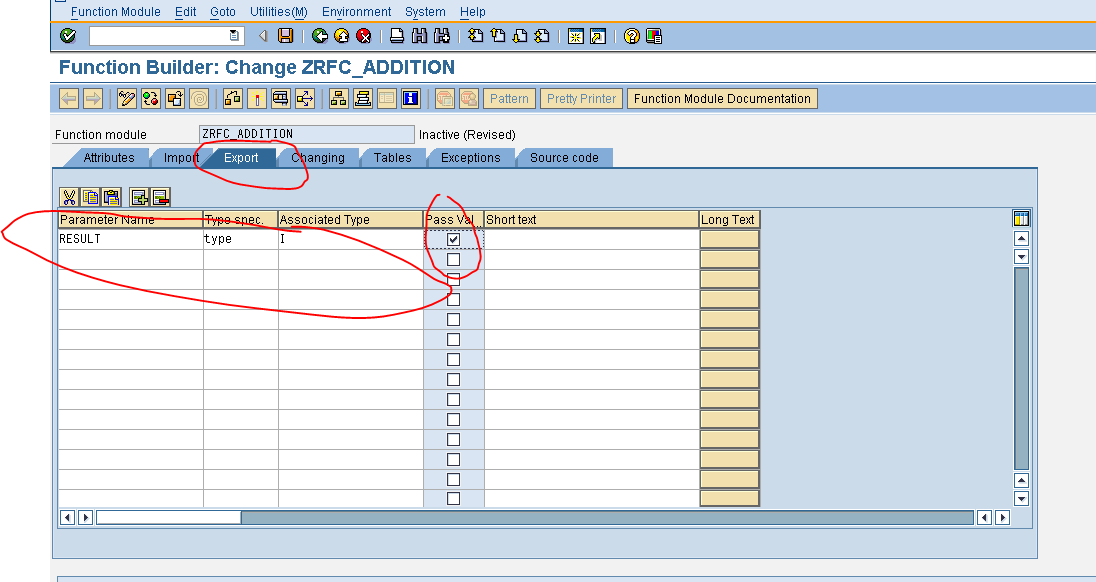
- Click on Export Tab.
- Enter the Export parameters.
- Click on Source Code Tab.
- Enter the logic.

- Save -> Check -> Activate.

- Now , logon into 800 client.

- Go to Transaction Code SM59.

- Initial Screen looks like.

- Click on ABAP connections and click on Create.

- Enter the RFC Destination .
- Enter the Description.

- To find out Targeted host.
- Go to 810 login option.

- Select the component and click on Change Item.

- Copy the IP address as well as System ID.

- Enter the Targeted Host and System ID ,

- Press Enter.

- Click on Logon & Security Tab.

- Enter the Logon Details.

- Click on Save.
- Pop-up will appear.

- Click on Continue.

- Click on Test Connection.

- Our connection works successfully .

- Go to Transaction code SE38 ( Client 800 ) .
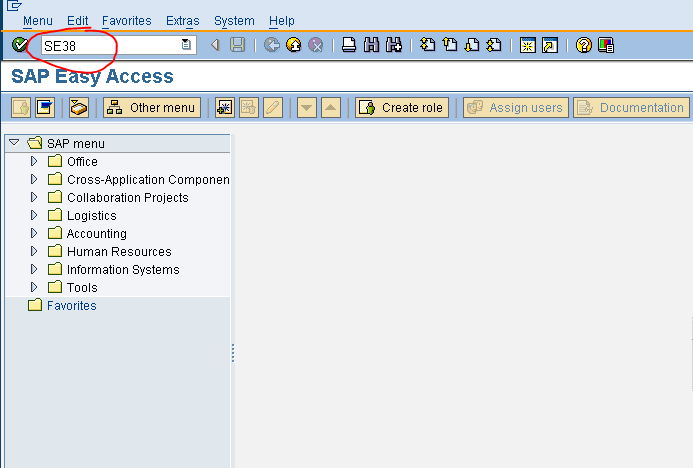
- Enter the program name start's with Y or Z < Program name > and click on Create .

- Enter the Title.
- Select the Attribute Types as Executable Program.
- Click on SAVE.

Source Code.

DATA : RES TYPE I.
PARAMETERS : N1 TYPE I,
N2 TYPE I.
CALL FUNCTION 'ZRFC_ADDITION' DESTINATION 'JD_CRASTA'
EXPORTING
V_N1 = N1
V_N2 = N2
IMPORTING
RESULT = RES
.
WRITE : / RES.
- Save -> Check -> Activate.

- Execute ( F8 ).

Input
- Enter the Input.

- Click on Execute.
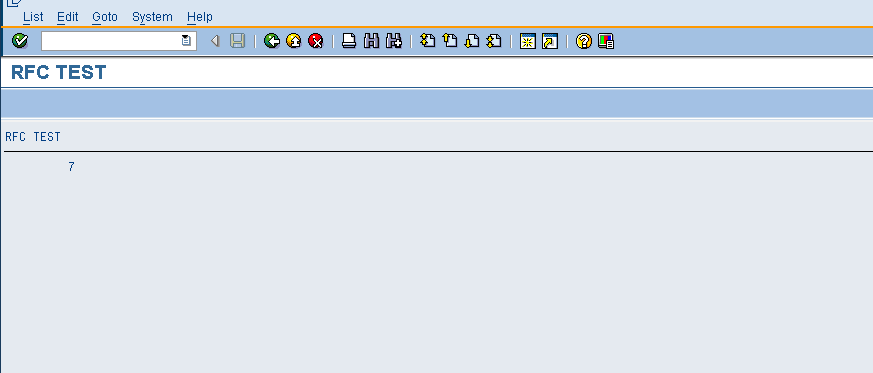
Output
Subscribe to:
Posts (Atom)