Showing posts with label #subroutine. Show all posts

Thursday, 30 June 2016

External Subroutine with passing parameters

  • Defining Subroutine
                PERFORM <SUBROUTINE NAME> IN PROGRAM <program name>
                                                            USING <AV1> <AV2>
                                                            CHANGING <CHANGING1> <CHANGING2>
                                                             TABLES <TABLE1> <TABLE2>.
                    
                                              or

                PERFORM <SUBROUTINE NAME> (program name)
                                                            USING <AV1> <AV2>
                                                            CHANGING <CHANGING1> <CHANGING2>
                                                            TABLES <TABLE1> <TABLE2>.
Ex:


Steps

  • Go to transaction Code SE38.
  • Enter the program name start's with Y or Z<program name > and click on create button.
  • Enter the Title.
  • Select Attribute Type as Executable Program.
  • Click on save button.


  • Source Code:
types : begin of ty_vbrp,
        vbeln type vbrp-vbeln,
        posnr type vbrp-posnr,
        matnr type vbrp-matnr,
        arktx type vbrp-arktx,
        netwr type vbrp-netwr,
       end of ty_vbrp.

data : wa_vbrp type ty_vbrp,
       it_vbrp type table of ty_vbrp.

parameters : p_vbeln type vbrp-vbeln.

perform fetch_data  IN PROGRAM ZSUB_INT_PASS_PARM
                 using p_vbeln changing it_vbrp.
perform display(ZSUB_INT_PASS_PARM) tables it_vbrp using wa_vbrp .


  • Save -> Check -> Activate.
  • Click on Execute ( F8).


Input


Output


Internal Subroutines with passing parameters

                PERFORM <SUBROUTINE NAME> USING <AV1> <AV2>
                                                   CHANGING <CHANGING1> <CHANGING2>
                                                      TABLES <TABLE1> <TABLE2>.
                        FORM <SUBROUTINE NAME > USING <FV1> <FV2>
                                                  CHANGING <CHANGING1> <CHANGING2>
                                                     TABLES <TABLE1> <TABLE2>.


                       ENDFORM.


  • In the above syntax <av1> and <av2> are actual parameters and <fv1> <fv2> are formal parameters.
Ex :


Steps

  • Go to transaction code SE38.
  • Enter the program name start's with Y or Z<program name > and click on create button.

  • Enter the Title.
  • Select Attribute Type as Executable Program.
  • Click on save button.


  • Either save it in Package or Local Package.

  • Source Code


TYPES : BEGIN OF TY_VBRP,
        VBELN TYPE VBRP-VBELN,
        POSNR TYPE VBRP-POSNR,
        MATNR TYPE VBRP-MATNR,
        ARKTX TYPE VBRP-ARKTX,
        NETWR TYPE VBRP-NETWR,
       END OF TY_VBRP.

DATA : WA_VBRP TYPE TY_VBRP,
       IT_VBRP TYPE TABLE OF TY_VBRP.

PARAMETERS : P_VBELN TYPE VBRP-VBELN.

PERFORM FETCH_DATA USING P_VBELN CHANGING IT_VBRP.
PERFORM DISPLAY TABLES IT_VBRP USING WA_VBRP .
*&---------------------------------------------------------------------*
*&      Form  FETCH_DATA
*&---------------------------------------------------------------------*
*       text
*----------------------------------------------------------------------*
*      -->P_P_VBELN  text
*      <--P_IT_VBRP  text
*----------------------------------------------------------------------*
form FETCH_DATA  using    p_p_vbeln
                 changing p_it_vbrp TYPE ANY TABLE.

  SELECT VBELN POSNR MATNR ARKTX FROM VBRP INTO TABLE p_it_vbrp
    WHERE VBELN = p_p_vbeln.

endform.                    " FETCH_DATA
*&---------------------------------------------------------------------*
*&      Form  DISPLAY
*&---------------------------------------------------------------------*
*       text
*----------------------------------------------------------------------*
*      -->P_IT_VBRP  text
*      -->P_WA_VBRP  text
*----------------------------------------------------------------------*
form DISPLAY  tables   p_it_vbrp TYPE STANDARD TABLE
                         "Insert correct name for <...>
              using    p_wa_vbrp like wa_vbrp.


LOOP AT p_it_vbrp INTO p_wa_vbrp .
  WRITE : / p_wa_vbrp-vbeln , p_wa_vbrp-posnr , p_wa_vbrp-matnr ,
  p_wa_vbrp-arktx , p_wa_vbrp-netwr.
ENDLOOP.
endform.                    " DISPLAY

  • Save -> Check -> Activate.
  • Execute (F8).

Input

Output

                                 more information................

Wednesday, 29 June 2016

Subroutines


  • A subroutine is a block of code introduced by FORM and concluded by ENDFORM.
  • Defining Subroutines.

                             FORM <subroutine> [<parameters>].
                                    <statements>
                             ENDFORM.
  • Calling Subroutines. 
  • Internal subroutines have the source code in the calling ABAP/4 program:  
                            PERFORM <subroutine> [<parameters>].

  1. Internal Subroutines without passing parameters
  2. External Subroutines without passing parameters
  • Understanding pass by value and pass by reference.
  1. Pass by Reference
  2. Pass By Value
                                    

  • To know more.


  • Passing variable / tables to subroutine.
  • Defining Subroutine
                PERFORM <SUBROUTINE NAME> USING <AV1> <AV2>
                                                                               CHANGING <CHANGING1> <CHANGING2>
                                                                              TABLES <TABLE1> <TABLE2>.
  • Implementing Subroutine.
                        FORM <SUBROUTINE NAME > USING <FV1> <FV2>
                                                                                 CHANGING <CHANGING1> <CHANGING2>
                                                                                 TABLES <TABLE1> <TABLE2>.


                       ENDFORM.


  • In the above syntax <av1> and <av2> are actual parameters and <fv1> <fv2> are formal parameters.
  • Note :
  1. Perform and form must contain the same number of parameters.
  2. The syntax on the perform and form statements can differ.
  3. The syntax on the form statement alone determines the method by which a parameters is passed.
  4. The value() addition cannot be used on the perform statements.
  5. Using must come before changing.
  6. The addition using can only occurs once in a statement.. The same rule applies to changing.


Internal Subroutines without passing parameters


  • Syntax :


  • Defining Subroutines.
                             FORM <subroutine> [<parameters>].
                                    <statements>
                             ENDFORM.

  • Calling Subroutines. 
  • Internal subroutines have the source code in the calling ABAP/4 program:  
                                 PERFORM <subroutine> .


Steps:

  • Go to transaction code SE38.
  • Enter the program name start's with Y or Z<program name > and click on create button.


  • Enter the Title.
  • Select Attribute Type as Executable Program.
  • Click on save button.
  • Either save it in Package or Local Package.
  • Write the code,
  • Source code,
TYPES : BEGIN OF TY_VBRP,
        VBELN TYPE VBRP-VBELN,
        POSNR TYPE VBRP-POSNR,
        MATNR TYPE VBRP-MATNR,
        ARKTX TYPE VBRP-ARKTX,
       END OF TY_VBRP.
    
DATA : WA_VBRP TYPE TY_VBRP,
       IT_VBRP TYPE TABLE OF TY_VBRP.
    
SELECT-OPTIONS : S_VBELN FOR WA_VBRP-VBELN.
    
PERFORM FETCH_DATA. " TO FETCH DATA


  • Double click on Subroutine name i.e FETCH_DATA .
  • Click on Yes.
  • Select the include and click on continue.
  • A subroutine name introduced by FORM and concluded by ENDFORM will appear.
  • Enter the source code.
form FETCH_DATA .

SELECT  VBELN POSNR MATNR ARKTX FROM VBRP INTO TABLE IT_VBRP WHERE
  VBELN IN S_VBELN.
endform.                    " FETCH_DATA

  • Create one more subroutine to display output.
  • Double click on subroutine name i.e DISPLAY .
  • Select the include and click on continue.

  • Enter the code.
LOOP AT IT_VBRP INTO WA_VBRP.

WRITE : / WA_VBRP-VBELN , WA_VBRP-POSNR , WA_VBRP-MATNR , WA_VBRP-ARKTX.
ENDLOOP.


  • Save -> Check -> Activate.
  • Click on Execute (F8).

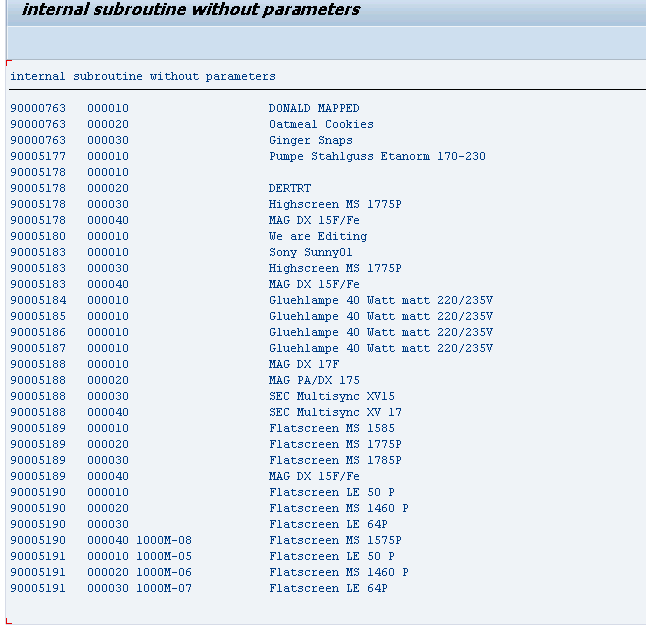
Input

Output